
Download PeaZip Portable – Free, Secure Multi-Format Compression Tool for Windows, Mac, and Linux
Introducing PeaZip Portable: A Powerful, Portable File Compression Solution
PeaZip Portable is a standout file compression and decompression tool that brings the full power of archiving to your USB drive or portable storage device without requiring installation. Designed for users who value privacy, speed, and flexibility, PeaZip Portable supports an extensive range of archive formats including ZIP, 7Z, RAR, TAR, GZ, BZ2, XZ, and many more. Unlike traditional software that installs system-wide, PeaZip Portable runs directly from a flash drive, making it ideal for use on shared computers, public terminals, or when you need to maintain a clean system environment.
The latest version features a refreshed interface with modern design elements and customizable themes, enhancing both usability and visual appeal. Whether you're compressing large project folders, securing sensitive data with password protection, or splitting files for easier transfer, PeaZip Portable delivers seamless performance across all platforms. Its lightweight footprint ensures minimal resource usage, while its robust feature set makes it a go-to choice for both casual users and advanced power users.
With support for AES-256 encryption, file splitting, checksum verification, and batch processing, PeaZip Portable is not just a tool—it’s a complete archiving ecosystem. Best of all, it’s completely free, open-source, and regularly updated to ensure security and compatibility with new file types and operating systems.
Key Features That Make PeaZip Portable a Must-Have Tool
PeaZip Portable stands out in a crowded market thanks to its rich feature set and user-centric design. One of the most compelling aspects is its multi-format support. It can create and extract archives in over 20 formats, including industry standards like ZIP and 7Z, as well as less common ones like RAR, TAR, and ISO.
This versatility eliminates the need for multiple tools, simplifying your workflow. The portable nature of the software is another major advantage—no installation, no registry changes, and no leftover files. Simply copy the folder to your USB drive and run it from any computer.
For users who prioritize security, PeaZip Portable offers AES-256 encryption with password protection, ensuring your sensitive files remain private. The File Tools section includes advanced utilities such as file splitting (ideal for uploading large files to email services), file joining (reconstructing split archives), and checksum verification (SHA-1, MD5, CRC32) to confirm file integrity after transfer. Additionally, the software supports batch processing, allowing you to compress or extract multiple files at once, saving valuable time.
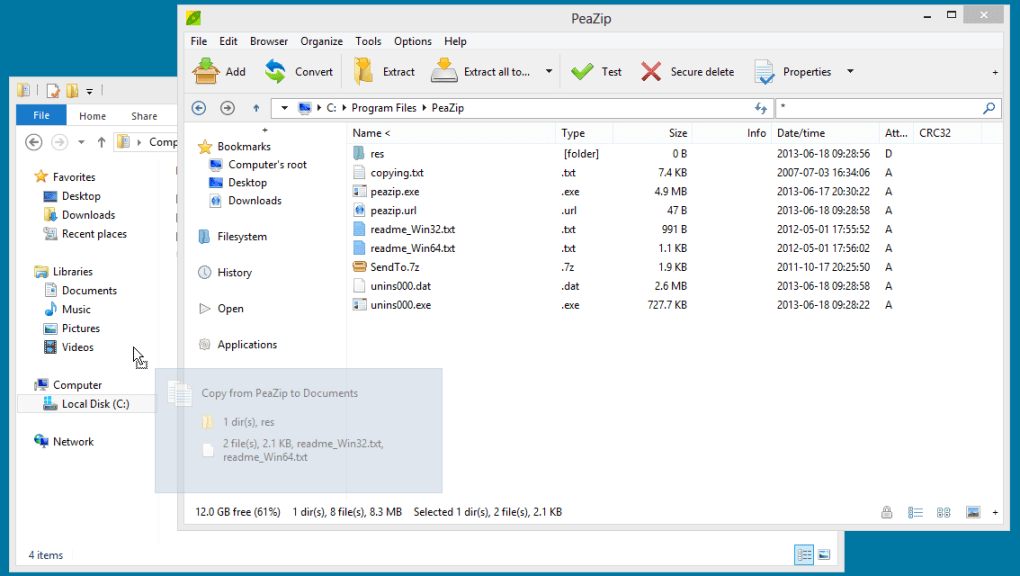
The context menu integration lets you right-click any file or folder and instantly access PeaZip’s functions—Add to Archive, Browse Archive, or Extract Here—making it incredibly convenient. The interface is intuitive, with a dual-pane explorer layout that mirrors file managers, so you can drag and drop files effortlessly. Whether you're a student, freelancer, or IT professional, PeaZip Portable adapts to your needs with precision and reliability.
- Supports over 20 archive formats (ZIP, 7Z, RAR, TAR, GZ, BZ2, XZ, ISO, etc.)
- Portable—no installation, no system changes
- AES-256 encryption with password protection
- File splitting and joining for easier file transfers
- Checksum verification (SHA-1, MD5, CRC32)
- Batch compression and extraction
- Right-click context menu integration
- Customizable themes and modern interface
- Open-source and free to use
- Regular updates for security and compatibility
How to Install and Use PeaZip Portable on Windows, Mac, and Linux
Using PeaZip Portable is refreshingly simple, especially for those who dislike complex software installations. To get started, download the portable version from the official website. The download is a single ZIP file containing all necessary components.
Extract this archive to your preferred portable storage device—such as a USB flash drive, external hard drive, or even a cloud-synced folder. Once extracted, locate the peazip.exe file (on Windows) or the PeaZip application (on Mac/Linux) and double-click to launch. No admin rights are required, and the software runs entirely from the portable drive.
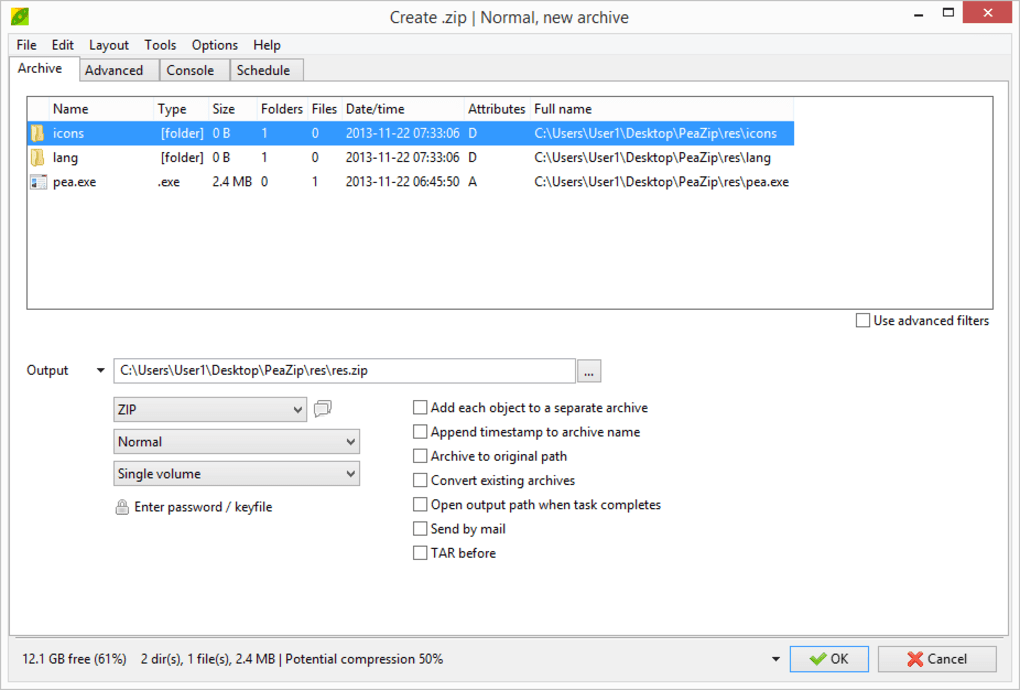
The interface opens with a clean, dual-pane layout: the left pane displays your file system, while the right pane shows the contents of the selected archive. To compress files, simply drag and drop them into the right panel or use the “Add to Archive” button on the toolbar. Choose your desired format, set a password if needed, and adjust compression level.
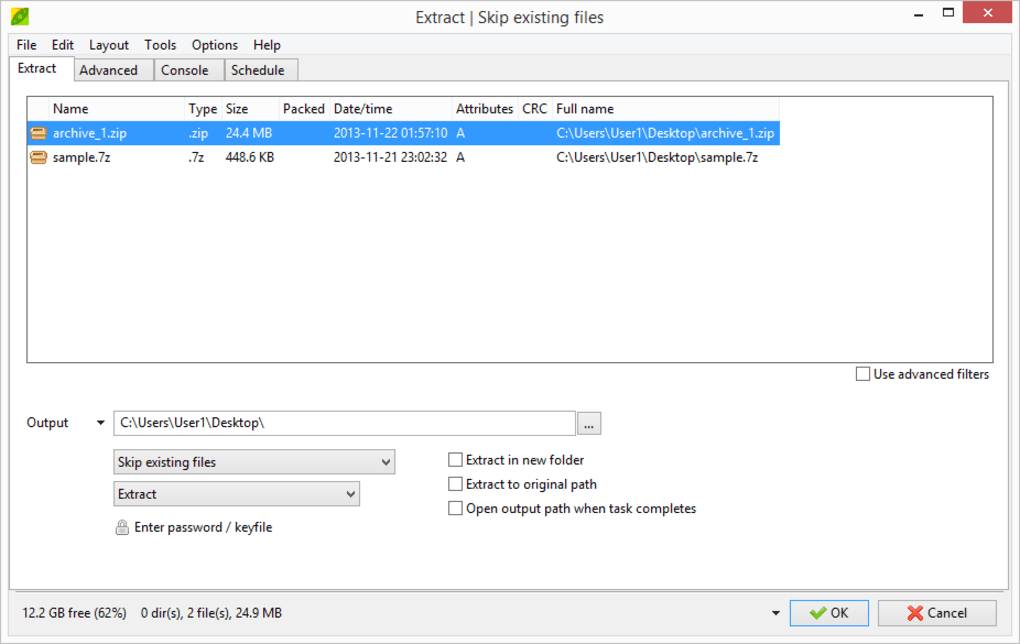
For decompression, right-click any archive file and select “Extract Here” or use the “Open Archive” option. The software automatically detects the archive type and begins extraction instantly. You can also use the File Tools menu to split large files into smaller parts, verify checksums, or join split archives.
On Mac and Linux, the process is equally smooth—just extract the package and run the app. PeaZip Portable is fully compatible with Windows 7 and later, macOS 10.12+, and most modern Linux distributions. Because it doesn’t install system-wide, you can use it on any computer without leaving traces.
This makes it perfect for temporary use, secure data handling, or maintaining consistent tools across multiple devices.
Compatibility, Pros, and Cons: A Balanced Review
PeaZip Portable is designed to work across a wide range of operating systems, including Windows (7 and later), macOS (10.12 and above), and Linux (with GTK support). It’s particularly well-suited for users who frequently switch between devices or work in secure environments where software installation is restricted. The software is lightweight and efficient, consuming minimal RAM and CPU, which ensures smooth performance even on older hardware.
Its pros include being completely free, open-source, secure, and portable—no installation means no risk of system conflicts. It supports a vast array of archive formats, offers advanced encryption, and includes powerful file tools. The interface is modern, intuitive, and customizable, with built-in themes for different preferences.
However, there are a few cons to consider. The user interface, while clean, may feel less polished compared to commercial tools like WinRAR or 7-Zip. Some advanced features, such as custom compression profiles, require navigating deeper menus, which might confuse beginners.
Additionally, while the software is updated regularly, the release cycle is not as frequent as some commercial alternatives. Despite these minor drawbacks, PeaZip Portable remains a top-tier choice for anyone needing a reliable, secure, and portable compression tool. Its balance of power, privacy, and usability makes it a standout in the open-source ecosystem.
- Pros: Free and open-source, portable, supports multiple formats, strong encryption, file splitting, checksum verification, no installation, cross-platform
- Cons: Interface slightly less polished than commercial tools, advanced features hidden in menus, slower update cycle than some competitors
Frequently Asked Questions (FAQ)
- Is PeaZip Portable completely free to use?
Yes, PeaZip Portable is 100% free and open-source. There are no hidden fees, trials, or watermarks. You can download, use, and distribute it without any restrictions.
- Can I use PeaZip Portable on Windows, Mac, and Linux?
Yes, PeaZip Portable is cross-platform. It runs on Windows 7 and later, macOS 10.12+, and most Linux distributions with GTK support. Simply extract the folder and run the executable.
- Does PeaZip Portable support RAR files?
Yes, PeaZip Portable can both extract and create RAR archives. It supports both RAR and RAR5 formats, making it a versatile alternative to WinRAR.
- How do I encrypt my archives with a password?
When creating a new archive, go to the “Advanced” tab in the compression settings and select “Encrypt files with password.” Choose AES-256 encryption for maximum security.
- Can I split large files into smaller parts using PeaZip Portable?
Yes, under the “Split” option in the compression settings, you can divide large archives into smaller chunks (e.g., 100MB each), which is ideal for emailing or uploading to cloud services with size limits.
- Is PeaZip Portable safe to download and use?
Yes, PeaZip Portable is safe and secure. It’s developed by a trusted open-source community and regularly updated for security patches. Always download from the official website to avoid malware.
Final Verdict: Why You Should Download PeaZip Portable Today
PeaZip Portable is more than just a file compression tool—it’s a secure, portable, and feature-rich solution for managing your digital files across devices. Whether you're a student handling project files, a professional sharing sensitive documents, or a tech enthusiast who values open-source software, PeaZip Portable delivers exceptional value. Its ability to run without installation, support for dozens of formats, and built-in encryption make it a must-have in your digital toolkit.
The software is fast, reliable, and constantly improved by a dedicated community. With no cost, no ads, and no system clutter, it’s a rare gem in today’s software landscape. If you’re looking for a free, secure, and portable compression tool that just works, PeaZip Portable is the answer.
Download PeaZip Portable today and experience the future of file archiving—effortless, powerful, and entirely under your control.







